
A video editor is not a special case, it is still a Phlo app
8 June 2026
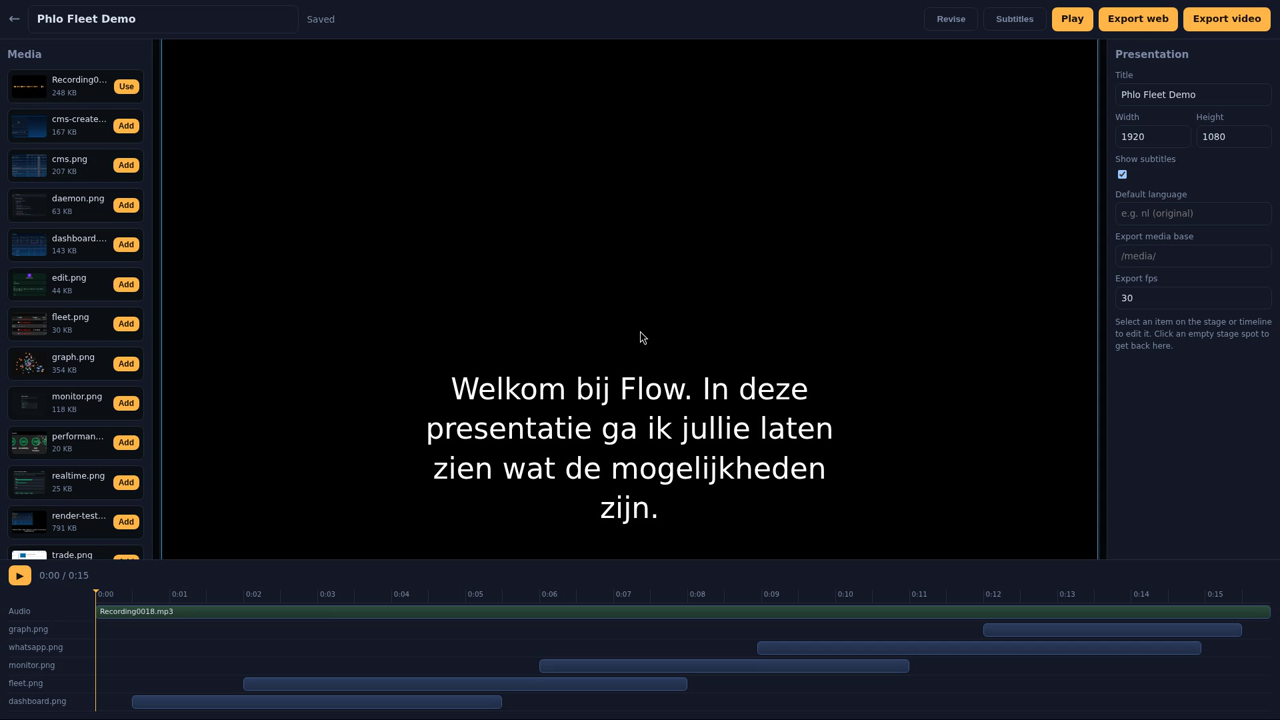
It is easy to assume a language built around routes, views and a database is fine for CRUD apps and out of its depth for anything heavier, client-side media work, say. Phlo Presentation exists partly to test that assumption: an audio-timeline editor for narrated presentations and short videos, built entirely on the same platform as everything else on this site.
What it actually does
Drag and resize images and clips on a stage, scrub a shared timeline, and preview live. A shared set of transitions (fade, zoom, wipe, cards) and "during" animations (Ken Burns, pan, pulse) drive both the live CSS preview and the canvas curves used for export, so what you see while editing is what actually renders. Whisper transcribes and a model translates, producing timed subtitle files per language. AI dubbing groups sentences and places generated narration on the timeline without cutting mid-sentence. An AI director can take a media library and a one-line prompt, caption the assets with vision, and compile a full timeline, voiceover and subtitles from a tempo preset, ready to refine by hand afterward.
New resources, no new templating layer
The client-side capability comes from three DOM resources: DOM/presentation (the audio-clock player itself, a dependency-free class that also drives the canvas renderer for export), DOM/recorder (screen, camera or canvas capture straight to a Blob), and DOM/ffmpeg (an ffmpeg-wasm toolkit for encoding in the browser, with a WebCodecs path first and a software fallback). None of this required a new templating layer or a special "media app" mode; they are resources like any other, loaded the same way a CMS field type is loaded, used from the same .phlo views and the same apply() protocol as a CRUD screen. The AI side (transcription, translation, dubbing, vision-captioning, the director) runs on the same AI/OpenAI resource used elsewhere on this site, plus ffmpeg/ffprobe installed on the server for transcoding, thumbnails and audio assembly, and an OpenAI key. Nothing exotic, the same pieces other posts in this series already cover, aimed at a heavier problem.
Export without a mismatch
Because the same transition and animation code drives both the live DOM preview and the deterministic canvas renderer, an export (a standalone zip that plays offline, or a client-side MP4 via WebCodecs with an ffmpeg-wasm fallback) always matches what was previewed. That is the same principle the rest of Phlo leans on elsewhere: one source of truth, read twice, rather than two implementations that can quietly drift apart.
The point of building it at all
A CMS demo proves Phlo can do CRUD well; a screen recorder, a video encoder and an AI-directed editor prove the platform is not secretly scoped to that. It is the same language, the same resource system, the same apply() protocol, applied to a genuinely different kind of app.