
22: Performance
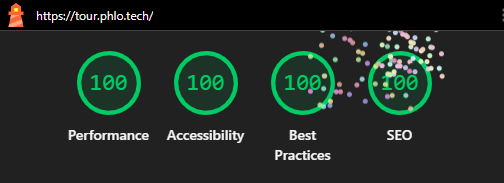
A Phlo app that follows the conventions in this guide starts from a strong Lighthouse position, because the architecture already does most of what the audits measure: server-rendered HTML, one small deferred script, one stylesheet, no framework payload and no third-party requests. This chapter maps correct Phlo use to the web's performance best practices, and covers the part that remains yours: images, markup and measurement.
22.1: What the platform already does
Every view() response is complete server-rendered HTML. The first paint is real content, there is no hydration step and no client-side rendering to wait for, so First Contentful Paint and Largest Contentful Paint are governed by your server time and your images, not by a framework.
The assets are equally spare. The build compiles all frontend code into one app.js (the phlo.js runtime plus your compiled scripts, typically a few tens of kilobytes) and all styles into one app.css. view() includes the script with defer, so it never blocks rendering, and emits Link: rel=preload headers for the stylesheet, the scripts and the icon sprite, so the browser starts fetching them before it parses the HTML. Every asset URL carries a ?version cache-buster from %app->version, which makes long cache lifetimes safe: bump the version on release and every client re-fetches exactly once.
In front of that, FrankenPHP serves HTTP/2 and HTTP/3 with automatic HTTPS and compresses responses (zstd, brotli, gzip) when your vhost enables it. None of this needs configuration in the app.
22.2: Server time: worker mode
Time to First Byte is the one Lighthouse metric that lives entirely on your server. In production, run the release build in worker mode (thread in the entry): the app stays compiled and resident in memory, so a request executes your route without any bootstrap. Development mode (build: true) checks sources and may rebuild during a request; it is the right mode to develop in and the wrong mode to benchmark.
Beyond that, server time is ordinary backend discipline: keep queries indexed and few (chapter 8 covers ORM caching), and push slow work out of the request. For genuinely slow responses, chunk() streams output line by line, so the browser renders progressively instead of staring at a blank page. For recurring work, %app->tasks moves it out of requests entirely.
22.3: The engine is not the cost
Phlo is a transpiler, not a runtime framework, and that is where the speed comes from. Your .phlo sources become plain PHP at build time: a route compiles to a match and a method call, a view to a function that concatenates strings, a resource to an ordinary class. Nothing is interpreted, reflected or assembled from a container while a request is in flight. By the time the first request arrives the framework has done its work and stepped out of the way, and worker mode (previous section) keeps that compiled app resident so it boots once rather than per request. What is left between the request and your code is a thin layer on a warm runtime.
We measured how thin. Three endpoints, a plain-text reply, an HTML table built in memory, and the same table from a MySQL query, were written twice: once in Phlo and once as hand-written PHP producing byte-identical output, then served from the same host, the same PHP binary and the same database. Across repeated runs the Phlo versions cost roughly a tenth of a millisecond more per request than the hand-written ones. That tenth of a millisecond is the entire engine tax: routing, the object layer and the response together.
Keep the number in proportion. At these sub-millisecond times the web server, TLS and the network are the larger part of every request, and the PHP layer, Phlo or hand-written, is a thin and nearly identical slice on top. On a real page the query, the rendering, the image and the round trip dwarf that tenth of a millisecond entirely. It is the same conclusion this chapter reaches from the other side: when a Phlo app is slow, the cause is in the page, not in the framework.
22.4: Images
Images decide most real-world LCP scores, and they stay your responsibility. The bundled img resource resizes, crops and converts with GD, so serve scaled files (a thumbnail where a thumbnail is shown) and prefer WebP output. In the markup, give every <img> a width and height (or CSS aspect-ratio) so the layout does not shift when it loads, use loading=lazy for images below the fold, and never lazy-load the LCP image itself.
Static files should ship long-lived cache headers from the webserver (Cache-Control: public, immutable with a long max-age); the ?version buster on generated assets makes that safe, and image URLs that change when content changes do the same for uploads.
22.5: Navigation: the SPA without the framework bill
With the DOM/link resource (or app.get() from your own script), an in-app navigation is one XHR returning apply() commands: the server sends only the DOM changes, the client applies them and path: updates the URL. There is no full reload, no re-download of CSS and JS, and Back and Forward restore snapshots instantly from history. View transitions animate the swap without costing a round trip.
This is where Phlo's zero-dependency stance pays directly in the Performance and Best Practices audits: there is no framework bundle to download, parse and execute, and no third-party origin to connect to. The blocking-time metrics (Total Blocking Time, interaction latency) stay low because the total JavaScript on the page is the runtime plus what you wrote, nothing more.
22.6: The other three audits
Accessibility is largely markup, and Phlo hands you the markup unwrapped: no generated wrappers, no synthetic buttons. Use the semantic element (<button>, <nav>, <main>), give images meaningful alt text, label form fields, and keep text contrast up in your theme. The lang attribute is set from %app->lang automatically.
Best Practices wants HTTPS, a sane console and no deprecated APIs. FrankenPHP's automatic HTTPS covers transport; the security resource's CSP modes (chapter 12) cover policy; and the engine's deprecation-free discipline keeps the console clean. Check the console on the release build once per release: a stray 404 on an asset costs points and is always a real bug.
SEO is chapter 17: the seo resource ships the sitemap, robots, canonical link and meta set from props you already define. A Phlo app with seo active and indexable set correctly scores this audit without further work.
22.7: Measuring honestly
Measure the release build on the production host, in a private window, against the public URL. Development mode skews every number: build: true may rebuild during the request, debug appends a debug payload to responses, and a dev vhost may lack the compression and cache headers of the production one. Lighthouse lives in Chrome DevTools; PageSpeed Insights runs the same audits from Google's infrastructure and adds field data when your site has traffic.
When a score drops, read the trace before changing code: the audit names the resource and the milliseconds. In a correctly configured Phlo app the usual suspects are, in order: an unscaled or non-lazy image, a slow query in the route, and a missing cache header on a static file. All three are visible in the waterfall, and none of them is the framework.
Last updated on 21 September 2026